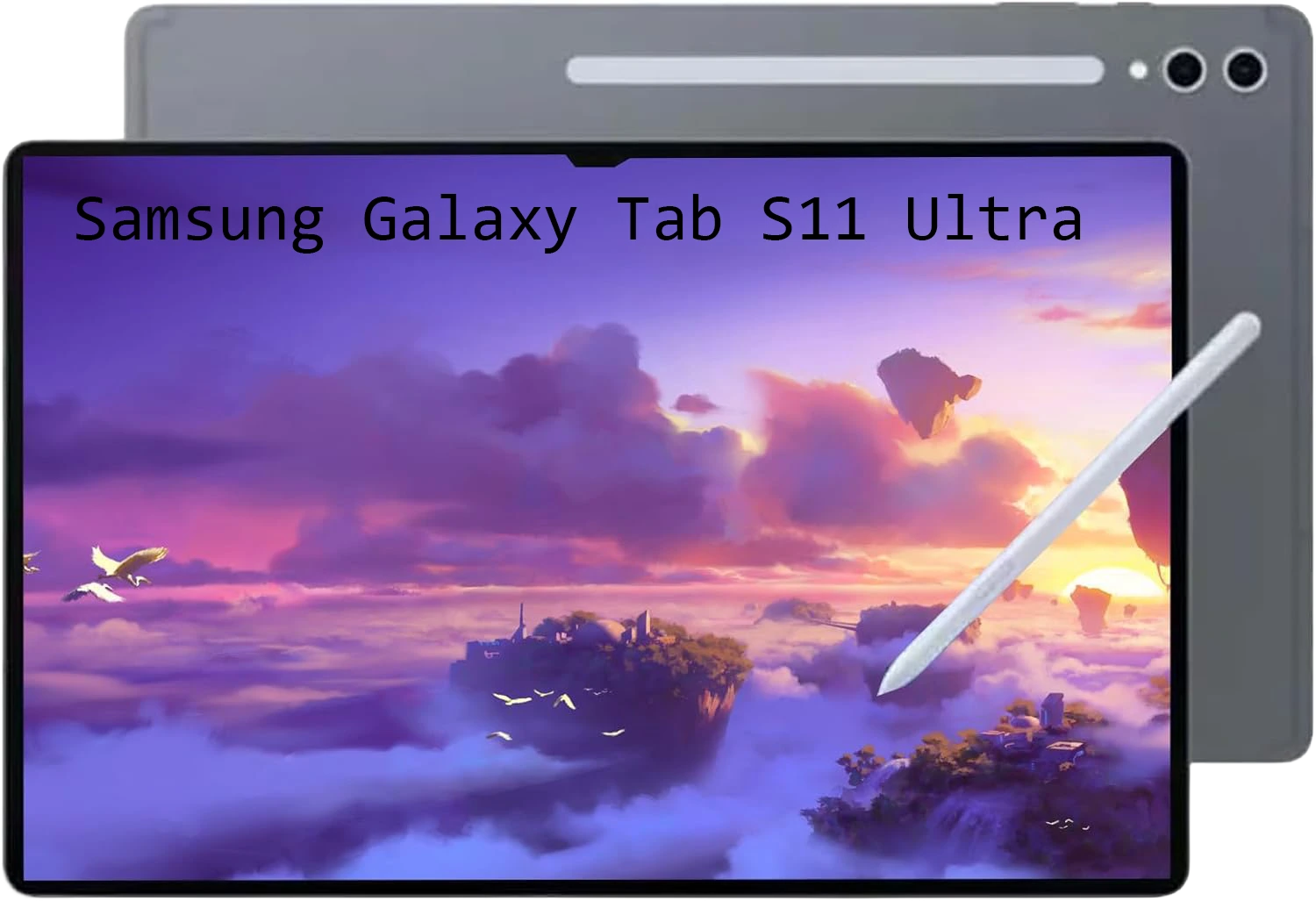
Samsung Galaxy Tab S11 Ultra
$995.00
You know that moment when you order something online, it arrives, and you open the box with this mix of excitement and mild fear? That was me with the Samsung Galaxy Tab S11 Ultra. I pulled this thing out, and I actually laughed. It’s ridiculous. The 14.6-inch screen makes every other tablet I’ve owned look like a Post-it note. For the past few weeks, I’ve been taking it everywhere—coffee shops, my couch, even on a plane (bad idea, by the way). I’ve tested the battery until it died, drawn terrible pictures with the S Pen, and tried way too hard to make it replace my laptop. In this guide, I’ll share everything you need to know about the Samsung Galaxy Tab S11 Ultra.
My First Thought: “How Do I Hold This Thing?”
I’m not kidding. The moment I unboxed the Samsung Galaxy Tab S11 Ultra, I just stood there holding it, trying to find a comfortable grip. At 692 grams, but it’s awkwardly balanced. And it’s thin. Like, terrifyingly thin at 5.1mm. Every time I picked it up, I had this irrational fear that it would snap in half if I gripped too hard. It hasn’t, obviously. But the feeling lingers.
The S Pen attaches magnetically to the back, which sounds great until you toss the tablet in a bag and realize the pen is now somewhere in the abyss. I lost it twice in one week. The Moonstone Gray color I got looks sleek and professional, though. I’ll give it that.
Samsung Galaxy Tab S11 Ultra Specs: What’s Under the Hood
Alright, let’s get the technical stuff out of the way so we can talk about what actually matters:
- Processor: MediaTek Dimensity 9400+ (fancy name for “this thing moves”)
- Display: 14.6-inch Dynamic AMOLED 2X, 2960 x 1848 resolution, buttery 120Hz refresh rate
- RAM: 12GB or 16GB (I tested the 12GB version)
- Storage: 256GB to 1TB, plus microSD slot up to 2TB (thank you, Samsung)
- Battery: 11,600mAh with 45W charging
- Cameras: 13MP + 8MP on back, 12MP on front
- Software: Android 16 with One UI 8
- Weight: 692g (Wi-Fi model)
- Dimensions: 326.3 x 208.5 x 5.1 mm
The Screen That Made Me Forget My TV
Okay, let’s talk about the star of the show. The 14.6-inch Dynamic AMOLED 2X display is genuinely breathtaking. Colors pop . Blacks are actually black, not dark gray. I watched Dune on this screen, and I kept pausing just to stare at the cinematography. The 120Hz refresh rate makes scrolling feel like silk. Everything is smooth, responsive, and gorgeous.
But Here’s the Thing About Big Screens
After a week, I noticed something. I stopped holding this tablet. It just lives propped up against something—a pillow, my laptop stand, a stack of books. Holding it in portrait mode feels unnatural, like you’re trying to read a small TV. Your wrist will absolutely let you know it’s unhappy after about fifteen minutes. This isn’t a couch-scrolling device. It’s a “set it down and use it properly” device.
Speed Test: Can It Handle Real Life?
I threw everything at this tablet. I mean everything. Genshin Impact on max settings? Smooth. PUBG? No lag. Video editing in LumaFusion while streaming music and bouncing between browser tabs? It didn’t even slow down. The MediaTek Dimensity 9400+ chip is no joke. Apps open instantly, multitasking feels effortless, and I never once saw a loading spinner that made me angry.
But Let’s Be Honest About “Pro” Performance
Here’s where I need to keep it real. If you run benchmarks, the S11 Ultra scores well. Really well. But it’s still not touching Apple’s M3 iPad Pro in raw number-crunching. For 99% of people—streaming, notes, gaming, light creative work—you’ll never notice the difference. But if you’re a professional video editor rendering 4K footage all day, you might hit some limits. For everyone else? Plenty fast.
One UI and Those AI Tricks
Samsung’s One UI 8 on Android 16 feels made for a screen this big. Running three apps side by side actually works without everything feeling cramped. The new Galaxy AI features surprised me. I expected gimmicks. Instead, I got useful tools. “Drawing Assist” took my terrible stick figures and turned them into something almost presentable. “Writing Assist” cleaned up my messy meeting notes. I actually use both regularly now.
The S Pen: Still Free, Still Great
Can we appreciate that Samsung still includes the S Pen in the box? Apple, take notes. The new pen has almost no lag—2.8ms if you care about specs. Writing on this screen feels natural, like actual paper, thanks to the texture. The hexagonal shape makes it comfortable to hold during long note-taking sessions. I’ve used it for meeting notes, doodling, and even signing documents. It’s genuinely useful, not a toy you’ll lose in a drawer.
Cameras: Better Than Expected
Let’s be real. Nobody buys a tablet this big for photography. But if you’re spending this much money, you still want decent cameras, right? The good news: they’re fine. The 13MP rear camera takes respectable photos in good light. Not iPhone level, but totally usable for scanning documents or snapping a quick pic.
Where It Actually Shines: Video Calls
The dual 12MP front cameras are clearly designed for our work-from-home reality. Auto Framing is genuinely magical. Walk around during a Zoom call? It follows you. Pace while presenting? Still centered. I took a meeting walking to my kitchen and back, and everyone said I stayed perfectly framed. That’s impressive.
Battery Life That Just Won’t Quit
This might be my favorite thing about the S11 Ultra. The 11,600mAh battery is an absolute monster. I streamed movies continuously for over 16 hours before it finally gave up. In real life? I used it heavily for two full days—work, gaming, streaming, video calls—before even thinking about charging. When you finally need juice, 45W charging gets you from zero to full in about 90 minutes. Not the fastest, but fair for a battery this size.
Wait, Can This Actually Replace My Laptop?
Samsung really wants you to believe yes. They sell this keyboard cover separately, and Samsung DeX turns the interface into something that looks like a real desktop computer. Plug into an external monitor, and you’ve got a full desktop setup.
The Honest Truth on Laptop Replacement
For basic stuff—email, web browsing, writing documents—yes, it absolutely works. I wrote most of this review on it. But if your job involves heavy Excel files, coding, or professional creative software, Android still isn’t quite there. It’s an amazing laptop companion. A full replacement? Not yet. But it’s closer than ever.
The Annoying Stuff Nobody Mentions
Let’s get real about daily frustrations. The fingerprint sensor is in a weird spot and often misses on the first try. Face unlock is slow and usually fails because the camera’s in the wrong place when the tablet’s landscape. The speakers? Fine. Clear, but lacking bass. Crank them up and they sound thin compared to the iPad Pro. And traveling with this thing means you need a bigger bag. It’s not fitting in your purse or small backpack.
Here’s a short comparison paragraph:
Samsung Galaxy Tab S11 Ultra vs. The Competition
So how does the S11 Ultra stack up against its rivals? The Xiaomi Pad 7 Ultra matches it with a gorgeous 14-inch AMOLED screen and actually beats it on camera specs, but Xiaomi’s software support isn’t as reliable. The older Samsung Galaxy Tab S8 Ultra still holds up with the same massive display and S Pen, but its battery life and processor lag behind the newer model. Meanwhile, the Huawei MatePad Pro is impressively light and bright, but running HarmonyOS means no Google Play services—a dealbreaker for most. For the average buyer, the S11 Ultra remains the safest bet: great battery, included S Pen, and years of software updates. Xiaomi’s catching up fast, though.
The Price Tag (Take a Breath)
Alright, let’s talk money. Premium device means premium price. The base model with 256GB storage starts around $1,199.99. Want more storage or RAM? You’re going higher. It’s available on Samsung’s website, Amazon, Best Buy—all the usual places. It’s expensive. There’s no way around that.
Conclusion:
So who should actually buy the Samsung Galaxy Tab S11 Ultra? If you’re an artist who wants a massive canvas, a movie lover who wants the best portable screen, or someone who lives in the Samsung ecosystem, you’ll probably fall in love with this thing. The display is incredible. The battery won’t quit. The S Pen is genuinely useful. But if you want a tablet to hold in bed, throw in a small bag, or just browse social media, this is overkill.
FAQs:
- Q: When did the Samsung Galaxy Tab S11 Ultra come out?
- A: Samsung released the Galaxy Tab S11 Ultra on September 4, 2025. So it’s still pretty new.
- Q: How much does the Samsung Galaxy Tab S11 Ultra cost?
- A: The Galaxy Tab S11 Ultra starts at $1,199.99 for the 256GB model. Prices vary by retailer, so shop around.
- Q: Does the Samsung Galaxy Tab S11 Ultra come with an S Pen?
- A: Yep! Unlike Apple, Samsung includes the S Pen right in the box. No extra purchase needed.